On MDL-74272 , I came across a comment wanting the display of the plugin name to be optional as a setting rather than only shown whilst editing:

This got me thinking! Looking into it, I’ve realised that at a basic level with the new Course Format API introduced in Moodle 4.0 that there would probably need to be core changes to make this happen as theme’s can’t change the data that’s used to control the template that renders the name on the page. However, themes can override the template. This I’ve discovered isn’t currently documented all that well. So here goes!
Disclaimers
Names / logos can be trademarks of their respective owners. Please review their website for details. I am independent from the organisations mentioned and am in no way writing for or endorsed by them. The information presented in this article is written according to my own understanding, there could be technical inaccuracies, so please do undertake your own research.
Research
Looking at:
- moodledev.io/docs/apis/plugintypes/format#templates-and-templateslocal
- moodledev.io/docs/apis/plugintypes/format#override-mustache-blocks
- moodledev.io/docs/guides/templates#overriding-templates-in-a-theme
There is nothing specific, so from MDL-73679 , I already knew how to override a course format template in a theme, the order of:
- theme/THEME/templates/FORMATPLUGIN/courseformat/local/content/section.mustache
- theme/PARENT_THEME/templates/FORMATPLUGIN/courseformat/local/content/section.mustache
- course/format/FORMATPLUGIN/templates/courseformat/local/content/section.mustache
- theme/THEME/templates/core_courseformat/local/content/section.mustache
- theme/PARENT_THEME/templates/core_courseformat/local/content/section.mustache
- course/format/templates/local/content/section.mustache
It’s then a matter of tracking down the actual Mustache template file that displays the actual plugin name. This turned out to be ‘cmname.mustache’ in ‘course/format/templates/local/content/cm’. Now we have something to work with.
Implementation and changes
All we need to do now is copy the template to a specific folder within the theme’s template folder (if it has one or create it if it does not). Thus ensuring you have the folder structure ‘/theme/yourtheme/templates/core_courseformat/local/content/cm’ and place your copy of ‘cmname.mustache’ in that.
Then it’s a simple matter of editing the file in a suitable UTF-8 editor, such as ‘ Notepad++ ’:
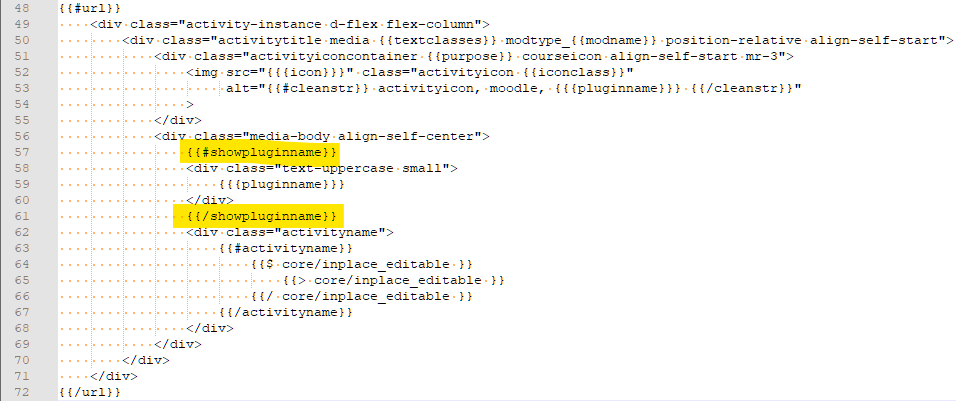
And with a bit of Mustache knowledge, removing the guard that controls the display of the plugin name to show it all of the time. Of course, you could always remove it completely and not show it at all.
But how did I know all of this? Well, I have been updating the ‘ MoodleBites Theme Design Level 2 ’ course for Moodle 4.1, and whilst its specifically not there, but template overriding and editing is, it could be if requested. And I’ve been updating my course formats and themes too for Moodle 4.0+ too. Both of are enabling factors that have given me the knowledge to write this post.
Conclusion
What do you think please?